How the Internet Actually Works (Explained Simply)
You use the internet dozens, maybe hundreds, of times a day. You open Instagram, send a message, stream a movie, search for a restaurant, check the weather, or click a link someone sent you. Most of the time, the information appears so quickly that it feels almost instant.
By Amari Brown on September 11, 2026
Getty Images
You use the internet dozens, maybe hundreds, of times a day. You open Instagram, send a message, stream a movie, search for a restaurant, check the weather, or click a link someone sent you. Most of the time, the information appears so quickly that it feels almost instant.
But the internet isn’t magic, and your phone isn’t somehow connected directly to every website in the world. Behind every click is a massive physical system of cables, computers, data centers, routers, and agreed-upon rules that work together to move information from one place to another.
The surprising part is that the basic idea behind it isn’t actually that complicated.
The internet is basically a giant network of networks
At its simplest, the internet is a way for computers to communicate with other computers.
Imagine a small office with ten computers connected together. Those computers form a network because they can exchange information. Now imagine connecting that office network to another network across town, then connecting both to thousands of other networks around the country.
Keep doing that worldwide and, in very simplified terms, you get the internet.
That’s why the word “internet” comes from the idea of interconnected networks. There isn’t one giant central computer running everything. Instead, millions of individual networks belonging to internet providers, universities, governments, businesses, cloud companies, and ordinary households are connected to one another.
Your home Wi-Fi network is one tiny piece of this enormous system.
What actually happens when you visit a website
Suppose you type a website address into your browser.
The first problem your computer has is surprisingly simple: it doesn’t really know what that name means.
Computers communicate using numerical addresses called IP addresses. A website name is primarily there because “example.com” is much easier for a person to remember than a string of numbers.
So your device uses something called the Domain Name System, or DNS. You can think of DNS as the internet’s contact list. It helps translate a human-friendly domain name into the IP address of the server your device needs to contact.
Once your computer has the address, it sends a request asking the server for the information needed to display the page.
The server responds, sending the website’s data back to your device. Your browser then interprets that information and turns it into the text, images, buttons, menus, and other elements you see on your screen.
This entire process can happen in a fraction of a second.
Your data doesn’t travel in one big piece
One of the cleverest parts of the internet is that information generally isn’t sent as one enormous package.
Instead, it is broken into smaller chunks called packets.
Imagine mailing a 500-page book but, instead of putting the entire book in one box, you separate it into small numbered bundles. Each bundle contains information about where it came from, where it’s going, and how it fits with the others.
Internet data works in a similar way.
When you send a photo, load a webpage, or watch a video, the information is divided into packets. Routers along the way examine where those packets need to go and help move them toward their destination.
Interestingly, all the packets don’t necessarily have to take exactly the same route. The network can choose different paths depending on traffic, outages, and available connections.
When the packets reach their destination, they can be put back together into something meaningful.
That flexibility is one of the reasons the internet can be so resilient.
The internet is much more physical than it feels
Because we talk about “Wi-Fi,” “wireless connections,” and “the cloud,” it’s easy to imagine the internet as something floating invisibly through the air.
In reality, the internet is remarkably physical.
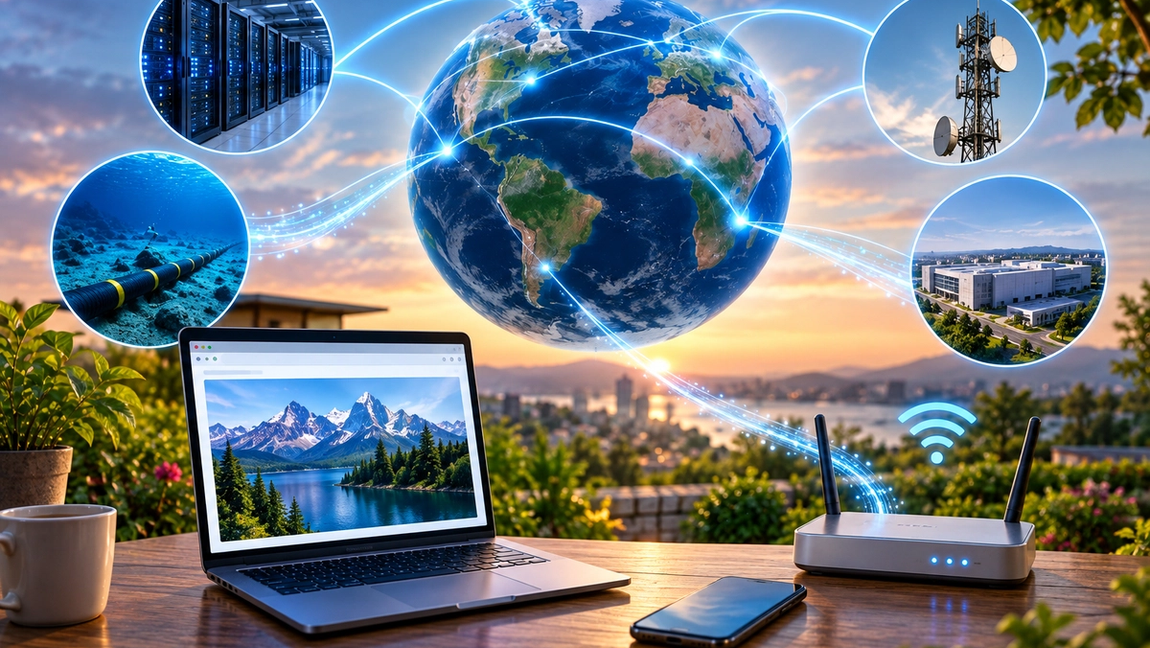
Huge amounts of internet traffic travel through fiber-optic cables. These cables transmit information using pulses of light and can carry enormous quantities of data extremely quickly.
Some of the most important cables are located underwater.
Submarine fiber-optic cables stretch across oceans and connect continents. If you are sitting in Europe and accessing information hosted on a server in the United States, your data may literally travel beneath the Atlantic Ocean.
There are also enormous data centers filled with servers that store and process much of what we access online.
Even “the cloud” isn’t really a cloud. It generally means computers and servers located somewhere else that you access through the internet.
Your vacation photos stored “in the cloud” still exist on physical hardware. It just isn’t sitting inside your house.
Wi-Fi and the internet aren’t the same thing
This is one of the most common internet misconceptions.
Wi-Fi is simply one method your device can use to connect to a local network. Your router then connects that network to your internet service provider, which connects you to the wider internet.
That’s why you can sometimes have excellent Wi-Fi but no internet connection.
Your phone might be communicating perfectly with your router while the router’s connection to your internet provider is down.
Mobile data works differently at the first stage. Instead of connecting through your home router, your phone communicates with a cellular network. But eventually, that network also connects into the broader internet infrastructure.
Different entrance, same enormous network.
How does the internet know where everything should go?
The internet works because connected devices follow standardized rules called protocols.
One of the most important groups is TCP/IP.
IP helps determine where information should be sent. TCP helps make sure data arrives reliably and can be correctly reconstructed. Other protocols handle specific jobs. HTTP and HTTPS, for example, are used when browsers and web servers communicate.
You don’t need to understand the technical details to understand why protocols matter.
Think about international shipping. Packages can move between countries because everyone involved follows agreed systems for addresses, labels, routing, and handling.
Internet protocols do something similar for digital information.
Billions of devices made by different companies can communicate because they agree on how information should be formatted, addressed, transmitted, and received.
What happens when you stream a movie
Streaming brings all of these ideas together.
When you press play, your device requests video data from a server. That data travels through internet infrastructure in packets until it reaches you.
But streaming services usually don’t send every viewer’s video from one giant server on the other side of the world. They often use geographically distributed servers and content delivery networks to keep popular content closer to users.
Your device also temporarily stores some upcoming video data in a buffer. That’s why a movie can continue playing smoothly even if your connection briefly slows down.
If your connection can’t receive data quickly enough, you’ve encountered everyone’s least favorite internet symbol: the spinning buffering wheel.
The internet is complicated, but the idea is simple
Modern internet infrastructure is extraordinarily sophisticated, but the basic concept can be reduced to something surprisingly understandable.
Your device asks another computer for information. The request is given an address, divided into manageable pieces, and routed through interconnected networks. The destination responds, and information travels back through those networks until your device receives it and turns it into something useful.
All of this is happening constantly, at enormous scale, across cables running through cities, countryside, data centers, and even the bottom of the ocean.
So the next time you tap a link and a webpage appears almost instantly, remember what just happened.
Your device found another computer somewhere in the world, exchanged a series of precisely organized packets with it, and assembled the response on your screen—often before you’ve even had time to think about it.